How to hash text on Mac
You have a string rather than a file — an API key, one line out of a config file, a sentence somebody wants a fingerprint of — and no wish to save it to a text file first or paste it into a stranger’s web form. The Text tool in Rocket Hash hashes it as you type, in eight algorithms at once, for nothing; this page covers that, and then the invisible details that decide what the answer turns out to be.
Hashing a file is the job everybody writes about. Hashing a string is the one that comes up more often in a normal week: somebody needs the SHA-256 of a license key, you want to know whether two config values are really the same, a vendor asks you to confirm a digest over a reference number.
Saving the string to a text file first is the obvious route and it is also a trap — most editors add a newline at the end, and that newline changes the digest completely. Pasting it into whatever hash site is top of the search results is the other obvious route, and it sends your string to somebody else’s server.
The Text tool does neither. You type, and eight digests appear underneath and keep up with you: SHA-256, SHA-384, SHA-512, SHA3-256, SHA3-512, CRC32, MD5 and SHA-1, recomputed on every keystroke. If you only ever want one of them, generating a SHA-256 specifically is the narrower page, and the in-browser SHA-256 generator on this site is a quick way to watch the idea work in a tab — one algorithm there, all eight of them here.
The Text tool in Rocket Hash costs nothing and stays that way — the one-time unlocks are for files and for verification. Nothing you type has anywhere to go: the app has no network access at all.
What actually gets hashed
A hash function does not take characters. It takes bytes, and the step that turns your sentence into bytes is where every surprise on this page comes from. Your text is encoded as UTF-8 — the same encoding the rest of the modern world uses — and those bytes, exactly those and no others, go into the algorithm. Nothing is appended: no newline, no null terminator, no length.
Which makes the byte count under the field the most useful number on the screen. It is not a character count. ASCII letters are one byte each, so abc is 3 bytes and hello world is 11, but an accented letter is usually two bytes, most emoji are four, and a thumbs-up with a skin tone modifier is eight — one pictogram, eight bytes, because it is two code points glued together.
Watch that number when you paste something. If you expected 40 bytes and the field says 41, you have a trailing space or a newline riding along, and the digest you are about to copy is the digest of something nobody else will ever reproduce.
Hash a string in the Text tool
-
Open the Text tool
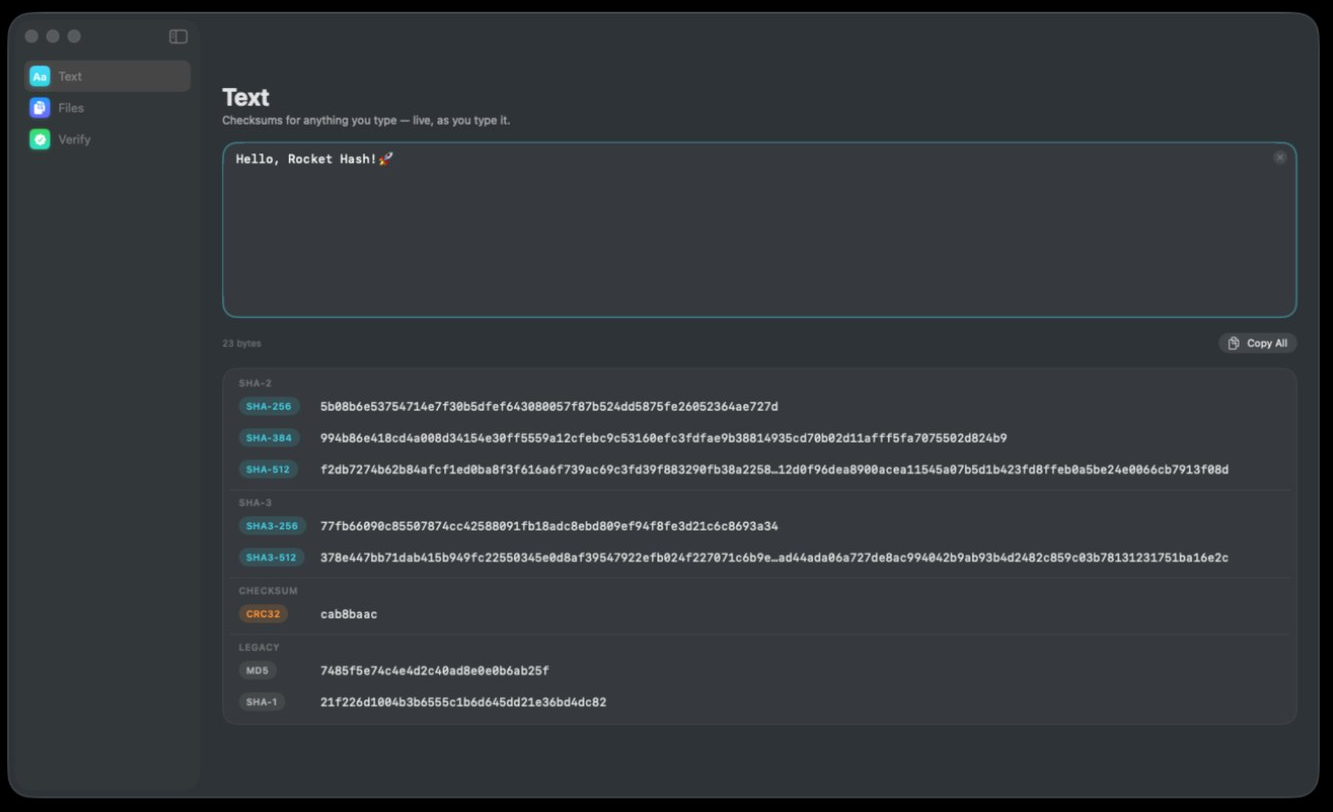
Click Text at the top of the sidebar — the cyan icon marked Aa, above Files and Verify. The heading reads Text and the line beneath it, Checksums for anything you type — live, as you type it, is a literal description rather than marketing.
-
Type or paste your text
The large field at the top takes anything — a word, a paragraph, a pasted JSON blob. There is no button to press and nothing to submit; every digest below recomputes as the characters land. The small ⊗ at the field’s top-right corner empties it when you are done with whatever you put in there.
-
Read the byte count
Underneath the field, on the left, is the number of bytes the algorithms are being handed — 23 bytes, say. Check it against what you expect before you trust anything below it. This one glance catches the trailing newline, the double space and the half-finished paste, which between them account for most of the digests that do not match.
-
Take the digest you need
The digests sit in four groups — SHA-2, SHA-3, CHECKSUM and LEGACY — each row a colored algorithm chip followed by the value in a monospaced font. Click the row to put that digest on the clipboard, or use Copy All on the right to take the whole set at once. Copying every hash at once covers which of those two forms belongs in a ticket and which belongs in a README.
Why two people hash the same sentence and get different answers
This is the real subject of the page. Hashing text is arithmetic and the arithmetic is never wrong; what goes wrong is that the two of you hashed different bytes while looking at what appeared to be the same words.
| What you typed | Bytes | SHA-256 begins |
|---|---|---|
abc | 3 | ba7816bf… |
abc with a trailing space | 4 | 5488613c… |
café, é as one character | 5 | 850f7dc4… |
café, e plus a combining accent | 6 | 81ef060b… |
That bottom pair is the one that ruins afternoons. Both render as café in every font on your Mac. One is the single code point U+00E9; the other is a plain e followed by an invisible combining acute accent, which is the form macOS has historically preferred for filenames. They are different bytes, so they are different digests, and no amount of staring at the screen will show you which one you have. The byte count will.
The other three causes, in the order they actually happen:
- A trailing newline. Almost always the answer when a string hashed here disagrees with the same string hashed from a file or a shell. Text files end in one by convention and
echoadds one by default. - Typographic substitution. Copy a string out of a web page, a PDF or a word processor and the straight apostrophe in
Don'tmay have become a curly one. Same five characters on screen; seven bytes instead of five, because the curly apostrophe takes three. - Characters with no appearance at all. Zero-width spaces, non-breaking spaces where an ordinary space belongs, a stray bidirectional mark. They paste along happily from anywhere and they show up nowhere except in the byte count.
Hand-retyping 64 characters introduces the one kind of error hashing cannot help you with. Click the row and paste. Unicode, emoji and invisible characters goes through the encoding cases in detail, and why two tools disagree covers the rest.
What all eight at once is good for
Seeing every algorithm side by side sounds like a party trick until one of these turns up.
Identifying a digest somebody gave you. You have a value and no idea what produced it. If you also know the input — a reference number, a known file name, the word test — type it here and look for the match. The length narrows it to one or two candidates and the exact value settles which. Without an input you can reproduce, counting the characters is as far as you can get.
Checking that the tool is telling the truth. NIST publishes digests for known inputs, and the simplest is the empty one. Clear the field and SHA-256 must read e3b0c44298fc1c149afbf4c8996fb92427ae41e4649b934ca495991b7852b855; type the three letters abc and it must read ba7816bf8f01cfea414140de5dae2223b00361a396177a9cb410ff61f20015ad. Any tool that disagrees with those two is broken, and testing a hashing tool in thirty seconds extends the trick to the other seven algorithms.
Giving somebody the digest they can use. If a colleague needs a checksum and has not said which kind, you can hand over all eight instead of a round trip. Whatever their tooling wants, it is in there — and the lengths make the translation obvious.
When typing the text is the wrong approach
Three cases, and in all three something else is the right tool.
You actually have a file. Hashing a file’s contents typed into a box is not the same as hashing the file, because the file has line endings, possibly a byte-order mark, and a final newline. Drop the file into Files instead and the digest you get is the digest of the bytes on disk — which is what anybody comparing against a published checksum computed. No page on this site does that, the eight calculators included: a browser tab hashes the characters you type into it, and a file sitting on your disk is the app’s job. If the reason you wanted the digest was to hold the file against a value somebody published, Verify is shorter still — checking a file against a published checksum goes through it end to end.
You are hashing a password. A general-purpose hash is the wrong function for password storage, and the speed that makes SHA-256 pleasant here is exactly the flaw there: a modern GPU works through billions of candidates a second. Password storage wants a deliberately slow, salted function — bcrypt, scrypt or Argon2. Hashing a password in this field to see what it looks like is fine; building a login system on it is not.
You want fifty digests, not one. The field is a single input: everything in it is hashed together, so fifty keys pasted in one after another produce one digest covering all fifty, not fifty digests. When you need them separately, give each string its own file and drop the whole lot into Files — one row per file, each with its own name and its own digest, and an export that writes the set out as a list you can keep. Hashing many files in one run covers what that looks like for a few thousand of them.
Troubleshooting
The digest changes when I retype the same string
Then you are not retyping the same string. Autocorrect and smart punctuation rewrite quotation marks and hyphens as you go, so the second attempt can genuinely contain different bytes from the first. Compare the byte counts of the two attempts — if they differ, that is your answer, and paste rather than retype.
My digest does not match the file with the same text in it
It is the final newline the editor added when it saved. A one-line file is one line plus a line ending, so the file is one byte longer than the text you typed. Windows line endings make it two. Hash the file as a file and compare that instead.
A digest from somewhere else does not match mine
Same cause again, arriving from a different direction. Anything that takes a string by way of echo is handed four bytes where you typed three, so abc comes back as edeaaff3… there and ba7816bf… here. Ask for the other side’s byte count rather than another digest: 3 against 4 explains the whole thing, and no second digest ever will.
I pasted something sensitive into the field
The ⊗ at the corner of the field clears it. There is no network in the app for anything to have left through, so the remaining copy to think about is the one on your clipboard if you clicked a row — copy something harmless afterwards and it is gone. If the stricter version of this worry applies to you, switch off Wi-Fi and watch the digests carry on appearing — there is nothing for the app to call.
The digest on screen has an ellipsis in the middle
That is the display shortening a value too long for the row — a SHA-512 is 128 characters and will not fit anywhere sensible. The value itself is intact; clicking the row copies all of it. If you want to read the whole thing with your eyes, paste it somewhere that wraps.
Frequently asked questions
How do I hash a string on a Mac without using Terminal?
Type it into the Text tool and read the answer — there is no command, no file to save and no button to press, and the digests update on every keystroke. Hashing text is the free half of the app, so there is nothing to buy before you can do it. For a quick look before you have it on screen, the in-browser SHA-256 generator on this site computes that one digest locally in a tab, with nothing uploaded.
Do I have to pay to hash text on a Mac?
No. Text hashing is free and gives you all eight algorithms — SHA-256, SHA-384, SHA-512, SHA3-256, SHA3-512, CRC32, MD5 and SHA-1. The two one-time unlocks cover hashing files and folders, and verifying a file against a checksum; neither is needed to hash text.
Why does my text hash differ from the same text in a file?
Because the file almost certainly contains one more byte than you typed: a newline at the end, added by the editor when it saved. Windows line endings add two. A hash covers every byte, so one extra byte produces a completely different digest: about half the bits of it flip, which in hexadecimal leaves almost none of the characters as they were.
Does hashing text include a newline at the end?
Not when you type it into the Text tool — exactly the bytes you typed are hashed, UTF-8 encoded, with nothing appended. Editors and shells are where the extra byte comes from: a text file ends in one by convention, and a string sent through echo arrives as four bytes where you typed three. The byte count under the field tells you which of the two you are holding.
How many bytes is an emoji when you hash it?
Most single emoji are four bytes in UTF-8, but the composite ones are longer — a thumbs-up with a skin tone modifier is eight bytes, because it is two code points, and a family emoji built from several people joined together can run past twenty. The byte count under the text field tells you the real number for whatever you pasted.
Can two different strings have the same hash?
Such pairs have to exist for every algorithm, because there are more possible inputs than digests — the question that matters is whether anybody can find one. For MD5 they can, in seconds on a laptop, and have been able to since 2004. For SHA-1 the first published collision arrived in 2017 and took a large amount of computation to build. For SHA-256, SHA-512 and both SHA-3 sizes, nobody has ever produced such a pair.
Can I get the original text back from a hash?
No. Hashing discards information, so there is nothing to reverse — a 3-byte input and a 3 GB input both come out as the same fixed length. Services advertising hash “reversal” are looking your value up in a table of previously hashed common strings, which works for password1 and for nothing you would care about.