How to copy every hash at once on Mac
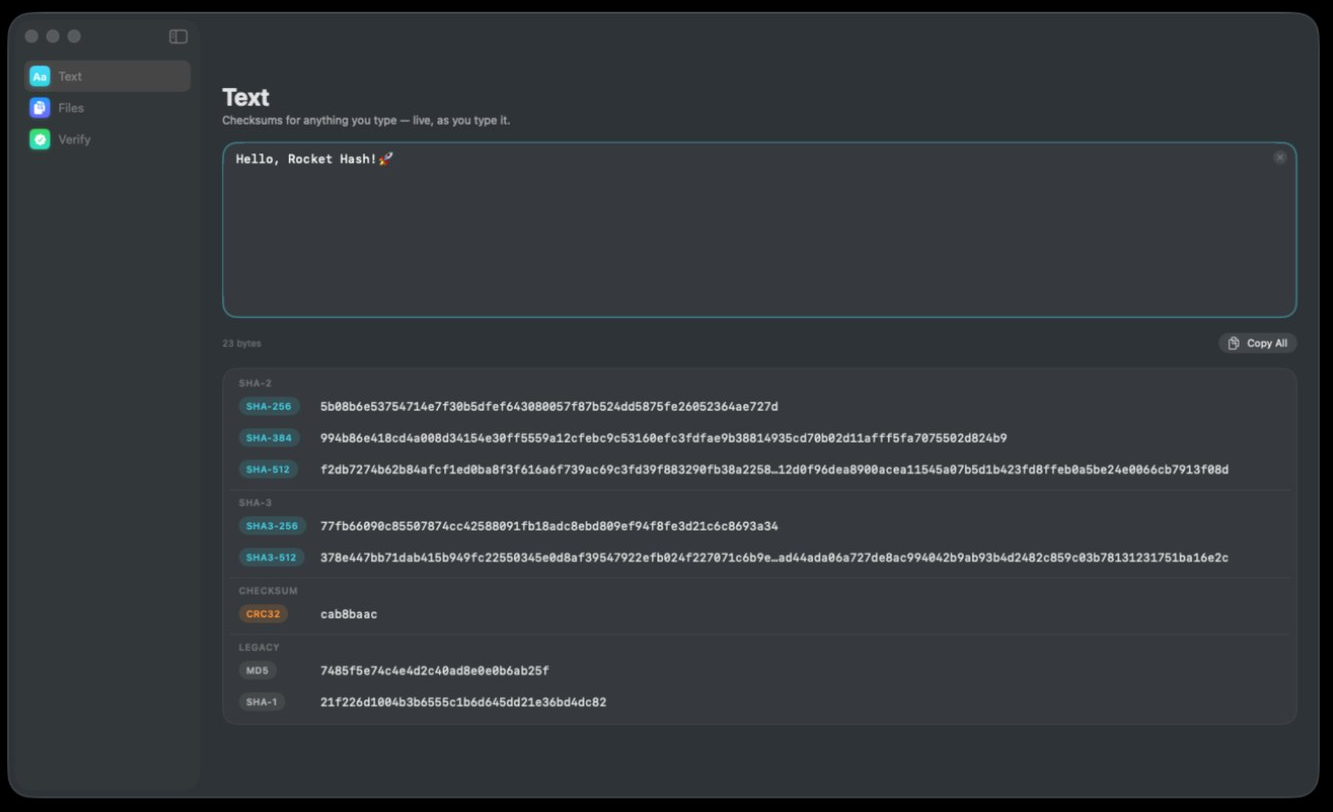
Every digest on screen is shortened in the middle so the rows stay readable, which means the screen is not where you get the value from. Rocket Hash has a route for one digest and a route for all eight at once — here is how each one works, and which of them belongs in a ticket, a README or a message to a colleague.
The digest is on screen and somebody is waiting for it. A ticket wants it in the description field, a release note wants it under the download link, a chat window has been open for five minutes. You look at the value and there is an ellipsis sitting in the middle of it.
That shortening is deliberate, and it is the right call — eight digests at full length would be eight lines of hexadecimal wrapping across the window, and nobody reads those. But it does mean the characters on screen are a view of the value rather than the value itself. There are two explicit routes out, one for a single algorithm and one for the whole set, and they are not interchangeable.
This page is about that last step, which is less trivial than it sounds: getting a digest out whole, and labeled well enough that whoever receives it can actually do something with it. It assumes you already have one on screen — hashing text as you type and hashing a file cover getting there.
Sixty-four characters of hexadecimal with nothing around them cannot be checked by anybody. Two things have to travel with it: which algorithm produced it, and what it describes. The rest of this page is mechanics.
Why the digest on screen is shortened
Long digests are truncated in the middle, not clipped at the end, and the choice tells you something about how people actually use them. When somebody compares two digests by eye they look at the first few characters and the last few. Keeping both ends on screen preserves the only check a human is any good at, and sacrifices the middle, which nobody reads anyway.
It is a better check than it looks, incidentally. One flipped bit in the input flips about half the output bits, which rewrites all but roughly four of the 64 characters — so a damaged file agreeing at both ends while differing in the middle is a one-in-18-quintillion coincidence, not a near miss. What the shortened form is no good for is transcription, and transcription is what you are about to do.
Copy one digest, or all eight
-
Click a row for a single digest
Clicking any of the eight digest rows puts that algorithm’s value on the clipboard — the complete value, not the shortened version you can see. This is the one you want most of the time, because most of the time somebody has asked for one specific algorithm.
-
Use Copy All for the whole set
The Copy All button sits to the right of the byte count, just under the text field. It gives you every digest in one block of plain text with each algorithm named beside its value, which is what you want when you do not know which algorithm the other end is going to ask for.
-
Paste it somewhere plain and count
Before you send it, paste it into an ordinary text field and check the length. SHA-256 and SHA3-256 are 64 characters, SHA-384 is 96, SHA-512 and SHA3-512 are 128, SHA-1 is 40, MD5 is 32 and CRC32 is 8. If what landed is shorter than it should be, something between the clipboard and the destination interfered.
-
Add the two labels that matter
Write the algorithm name and the thing the digest describes next to it — a filename with its size, or the exact string you hashed. The labeled block already names the algorithms; neither form knows what the subject was. A digest without a subject is a number nobody can reproduce.
Which form belongs where
One digest or all eight is not a matter of taste. Sending the wrong one either wastes the reader’s attention or quietly weakens what you are publishing.
| Where it is going | Send | Why |
|---|---|---|
| A bug report or support ticket | One digest, plus the filename and size | Somebody has to find the same file before the digest helps |
| Release notes or a README | One digest, the algorithm you want used | Offering several invites people to check with the weakest |
| A chat message | One digest, in a code span | Chat clients reflow and reformat plain text |
| A colleague with unknown tooling | The labeled block | They can use whatever their machine already has |
| A spreadsheet or audit record | One column per algorithm, formatted as text | Numeric columns eat leading zeros |
| More than a handful of files | Not the clipboard at all | See the manifest route below |
The second row is the one people get wrong. Publishing an MD5 next to a SHA-256 looks generous and is not: a verifier will reach for whichever one their tooling makes easiest, and you have handed them a choice that includes the broken option. Pick one, make it the strongest you can reasonably expect people to have, and say which it is. Publishing checksums with a release goes through the whole decision.
What mangles a digest in transit
A digest is a long token of undifferentiated characters, which is exactly the kind of thing software likes to tidy up on your behalf. Four things to watch for:
- Soft wrapping. A 128-character SHA-512 will not survive an email client that wraps at 78 columns — the break often arrives at the other end as a real newline inside the value. Put it in a code span or on a line of its own.
- Leading zeros. A CRC32 such as
00123456is eight characters, and a spreadsheet that decides it is a number will show you six. One containing a letter survives untouched, which is why the problem looks intermittent. Format the column as text before you paste. - Rich text. Copying out of a formatted document can bring a non-breaking space along with it, which looks exactly like a space and compares as something else. Paste as plain text when you have the option.
- Case. Hexadecimal is not case-sensitive as a number, but a script comparing two strings has no idea about that. Pick lowercase and stay with it.
When the clipboard is the wrong tool
The clipboard holds one thing at a time, which puts a hard ceiling on this whole approach at roughly as many digests as you are prepared to paste by hand. For files there are two better exits. Each row in the file list has its own copy button for the digest it is showing, and the row’s disclosure chevron expands to show every algorithm for that file when you want to see them side by side.
Past a dozen files, stop copying and export instead. The export control in the toolbar writes the finished run out as a shasum-compatible manifest: one line per file, in the format every command line tool on every platform already reads. Exporting a manifest covers the mechanics and the format of a SHA256SUMS file explains what the receiving end sees.
A manifest also survives being kept, which a pasted digest rarely does. A month later you can re-hash the same folder and compare the two lists instead of reading hex, and the person you sent it to can check it with one command rather than by eye.
Troubleshooting
The pasted value is too short
Count it against the expected length for that algorithm — 64 for SHA-256, 40 for SHA-1, 32 for MD5. A value that is short by a handful of characters was usually broken across a line somewhere and lost the fragment; one that is short by about half was probably cut at a column limit. Paste it again into a plain text field and check there before blaming the source.
I copied the wrong algorithm’s digest
Each row carries a colored chip with the algorithm’s name on it, and the rows are grouped by family — SHA-2, then SHA-3, then the checksum, then the legacy pair — rather than ordered by length. SHA-256 and SHA3-256 are both 64 characters, so you cannot tell them apart after the fact by looking at the value. Check the chip, not the length.
I wanted one digest and got all of them
You used Copy All, the control beside the byte count, rather than clicking a digest row. Both are useful; the block is just the wrong thing to drop into a field that expected sixty-four characters. Click the row itself for a single value.
The block lost its layout when I pasted it
You pasted plain text into something that reflows plain text, which is most chat clients and any rich-text editor. Wrap it in a code block or a code fence so the destination stops trying to help, or attach it as a file if the destination supports that.
I need digests for two hundred files
Then the clipboard is not the instrument. Hash the folder, export the manifest, and send or commit that file. Checking files against a manifest shows what the other end does with it, which is what makes the export worth more than the paste.
Frequently asked questions
Can I copy all eight hashes at once?
Yes. The Copy All button beside the byte count gives you every algorithm in one block of plain text, each digest labeled with the algorithm that produced it. Use it when you do not yet know which algorithm the other end will ask for; when you do know, clicking that single digest row is tidier.
How do I copy a hash without the ellipsis in the middle?
The ellipsis only exists in the display, to keep long digests on one line. Clicking the row copies the full value regardless of what is shown, so you never need to widen a window or select text by hand. Paste it into a plain text field and count the characters if you want to confirm.
Why is my pasted SHA-256 shorter than 64 characters?
Something between the clipboard and the destination truncated or wrapped it. The usual suspects are an email client breaking the line at 78 columns, a form field with a maximum length, or a spreadsheet cell treating the value as a number. Paste into a plain text editor first, confirm the length there, and move it on from that.
Should I publish MD5 and SHA-256 together?
Better to publish one. When several are offered, people verify with whichever their tooling makes easiest, so including MD5 or SHA-1 gives a verifier permission to use a function that is no longer collision-resistant. Publish a single SHA-256, label it clearly, and say what file it belongs to.
What should I send alongside a checksum so it is actually useful?
The algorithm’s name, the exact filename, and the file’s size in bytes. The algorithm stops the recipient computing the wrong function, the filename stops them checking the wrong file, and the size catches a truncated download before they bother hashing anything. Sharing a checksum covers the harder question of how to send it so it proves anything.
Does it matter whether a hash is uppercase or lowercase?
Not to the value — hexadecimal digits mean the same thing in either case, so A9993E36 and a9993e36 are the same number. It matters a great deal to software that compares the two as strings rather than as numbers, which is most software. Settle on lowercase, which is what nearly every tool prints.