How to export a checksum manifest on Mac
Four hundred rows of hexadecimal on screen is not a record of anything — it is a window you are about to close. The export button turns a finished run into a plain text manifest in shasum's own format: one line per file, a digest and the path it belongs to. Here is what Rocket Hash writes out, what to call the file, where to keep it, and how to check one line out of it a year later.
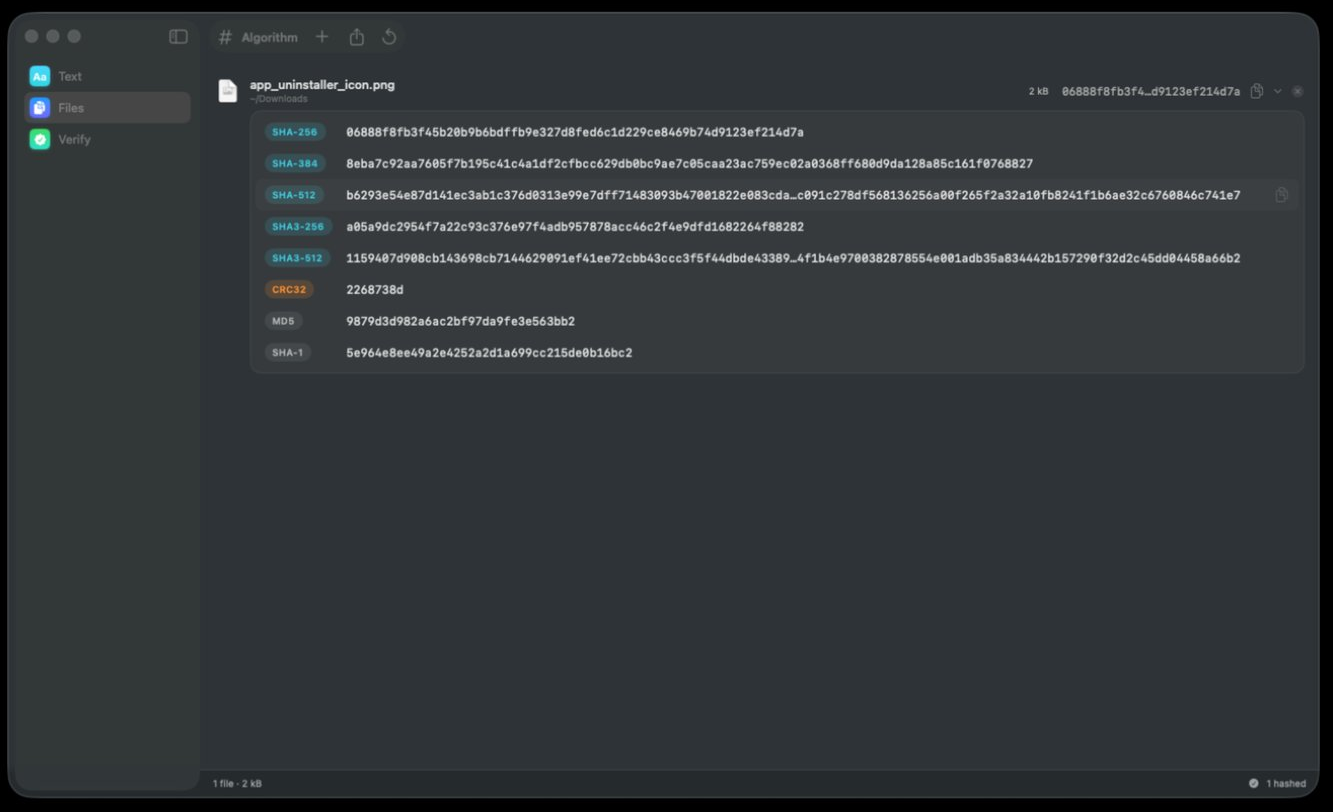
You have just hashed a folder. The digests are on screen, each one shortened in the middle so the rows stay readable, and the whole point of computing them was something you will do later — check this archive again next winter, attach the list to a release, prove to a client that the drive you couriered holds the files you copied onto it. None of that works from a window.
What you want is a manifest: a plain text file with one line per file, each line a digest followed by the path it describes. The Files tool writes one with the export button in the toolbar, and the format it writes is the format shasum itself prints — so the file is not something only this app can read. Anything that can check a checksum, on any operating system, for as long as SHA-256 exists, can read it.
This page is about producing that file well: the one decision to make before you start, what ends up inside it, what to name it so it still makes sense in two years, and what other people see when they open it. If you want the line-by-line anatomy of the format first, what a SHA256SUMS file contains takes one apart field by field.
A manifest can only be checked by recomputing the same function, so the algorithm you pick is baked into the file for its whole life. SHA-256 unless you have a specific reason otherwise.
What ends up in the file, and what does not
A manifest is two columns and nothing else. The digest, then the file it belongs to. That economy is why the format has outlived every tool that ever wrote it, and it is also why you should know what it leaves behind.
| Recorded | Not recorded |
|---|---|
| Every byte of file content, as one digest | File size, modification date, permissions |
| The path, written the way it was when you hashed it | Where the folder was, or which volume it was on |
| Which algorithm, implicitly, through the digest's length | Which algorithm, explicitly, by name |
| One line per file, in the order the run produced them | Any claim that the list is complete |
| Who made it, or when — unless you put that in the filename |
Two of those matter more than the rest. The manifest does not say who wrote it, so it is evidence of integrity and never evidence of origin — what a digest proves about tampering is the longer version of that sentence. And it does not say how many files should be there, which is the one thing a later check cannot infer: anything added to the folder after the export is simply absent from the list, and nothing reading the list later has any reason to go looking for it.
Export a manifest
-
Set the algorithm first
The Algorithm control in the Files toolbar — the one marked with a
#— decides which digest the exported lines carry. SHA-256 is the right default and the one nearly every other tool assumes. It is not a switch over what gets computed — every file is read once and all eight algorithms come out of that pass — so changing your mind later costs you a second export rather than a second run. -
Add everything the list should cover
Drag in the folder, the selection, or the whole drive's worth — files and folders both arrive by drag-and-drop or through the add button, and a folder brings everything underneath it. Add it all before you export rather than in two passes, because a manifest's value is that it describes one coherent thing: this archive, this release, this handover. Running a large batch has the practical side of queueing thousands of files.
-
Let the run finish
Watch the two halves of the status bar: the summary on the left counts what is loaded (“1 file · 2 kB”), and the progress on the right counts what is done (“✓ 1 hashed”). When those agree, every row has a digest. A long run can be paused and picked up again from the exact byte, so there is no pressure to sit through it — but do get to the end before you export, because a list whose coverage you cannot vouch for is worse than no list at all.
-
Export the list
The export button in the toolbar writes the run out as a
shasum-compatible manifest. That is the artifact — the thing you keep, commit, attach, or hand over. Everything still on screen after this point is a convenience; the file is the record. -
Name it, and store it away from the data
The filename is the only metadata the format has, so make it carry the two facts the lines cannot: what the list covers and when you took it.
photos-2019-2024-sha256.txtearns its keep;checksums.txtdoes not. Then put a copy somewhere other than the disk it describes — a manifest that lives only on the drive it was made from disappears in exactly the failure it was meant to survive.
What to call it and where to put it
There are three or four conventions in the wild and they are conventions, not rules. Pick by who reads the file next.
| Name | Reads well when |
|---|---|
SHA256SUMS | It sits in the same directory as the files it covers, for strangers to find. The convention Linux distributions use, so nobody has to be told what it is. |
myapp-2.4.1.zip.sha256 | There is one download and one digest. A sidecar next to a single file, named after it. |
archive-2026-09-12.sha256.txt | You will make another one next quarter and compare them. The date is the whole point. |
handover-clientname-final.txt | It travels with a delivery and will be read by a human before any tool touches it. |
Two things to avoid. Do not give a manifest a .sha256 extension and then edit it in an app that rewrites line endings or adds a trailing space — the format is strict about its separator and unforgiving about stray characters. And do not keep one growing list for everything you own; one manifest per archive, per release, per job, means a failure is unambiguous about what failed.
What the exported file looks like
Open the export in any text editor and there is nothing to decode. One line per file: the digest, two spaces, then the path it belongs to. Nothing wraps it and nothing introduces it — the first line of the file is already the first file of the run.
9f86d081884c7d659a2feaa0c55ad015a3bf4f1b2b0b822cd15d6c15b0f00a08  raw/DSC_0041.NEF
2c26b46b68ffc68ff99b453c1d30413413422d706483bfa0f98a5e886266e7ae  raw/DSC_0042.NEF
fcde2b2edba56bf408601fb721fe9b5c338d10ee429ea04fae5511b68fbf8fb9  exports/contact-sheet.pdf
The digest comes first for a practical reason: it makes the list sortable by content, so two files holding the same bytes land on adjacent lines whatever they happen to be called. That is the whole basis of finding duplicate files by hash. The second column is a note about where each file was standing when you hashed it — handy for finding it again, and not a claim about anything.
When you compare one export against another — last quarter’s list against this quarter’s — match the lines by their path rather than by their position. The order follows the run rather than the alphabet, so two lists describing the same folder can hold the same lines in a different sequence without anything being wrong.
Being text, one line per file, a manifest is also unusually good material for version control. Git cannot diff a raw file or a font binary in any useful way; it diffs a manifest perfectly, and one changed line means one changed file with a date and an author attached to it. Commit the list beside a dataset, a set of fixtures or a folder of anything else binary, and the history turns into a dated record of which file changed when — which is not something a backup tool will hand you.
Checking one line from the list later
A year on, the question is usually not “is the whole archive intact” but “is this one file still the file that line describes”. That needs no second run over the folder. Copy the digest out of the line, open Verify, leave the segmented control on Against a Checksum, paste the digest in and drop the file the line names. The answer comes back as a green seal and a sentence instead of two 64-character strings to compare by eye.
Two things make this the quick route. The algorithm is worked out from the digest you paste, so you do not have to remember which one the list was made with — a 32-character line is read as MD5, a 128-character one as SHA-512, without being told. And the file can be anywhere, because you hand it over yourself rather than pointing at a path: a list whose second column stopped being true the day the drive was renamed still checks out line by line. For the whole list in one pass, and for the files that arrived after it was written, checking files against a manifest is the other half of this page.
When a manifest is the wrong shape
It is the wrong shape for a single digest in a message. If one person needs one value for one file, the list format adds ceremony and a second thing to explain; send the digest itself, with the three facts that make it usable — sharing a checksum covers what those are and why the channel you send it on matters more than the format.
It is also the wrong shape when what you genuinely need is one string standing for a whole tree. There is a respectable trick for that, described in hashing a folder: hash the manifest. Drop the exported list back into the Files tool and the digest of that one small text file stands in for every byte underneath it — and it only reproduces if the list comes out identical both times, line order included.
Troubleshooting
The manifest has fewer lines than I expected
Either the run had not finished, or the folder holds fewer files than the Finder suggested — an alias, a symlink and a package are all one item on screen and something else underneath. Compare the line count against the file count in the status bar summary rather than against your memory of the folder, and re-export if they disagree.
The manifest has more lines than I expected
Folders recurse, and a Mac folder contains things the Finder politely hides: .DS_Store in every directory you have ever opened, ._ companion files on drives formatted for Windows, and the entire contents of any app or bundle you dropped in. They are real files with real bytes, so they get real lines, and none of them is a reason to distrust the export.
The digests are the wrong length
Count one line's first column: 64 characters is SHA-256, 128 is SHA-512, 96 is SHA-384, 40 is SHA-1, 32 is MD5, 8 is CRC32. If it is not the length you wanted, the Algorithm control was set to something else when you exported — change it and export again, which needs no second pass because every algorithm already came out of the one read. A manifest cannot be converted from one algorithm to another — the only thing in the world that produces the new digest is the file itself.
Whoever I sent it to says it will not parse
Almost always the file was edited on the way. The separator is unforgiving and so is the filename field: an editor that collapsed the two spaces into one leaves a line nothing will parse, and one that saved Windows line endings welds an invisible carriage return onto the end of every filename in the list. Send the exported file as it came out, attached rather than pasted into a message — and if the copy they are holding has already been through an editor, export a fresh one and send that instead of trying to repair it at their end.
The run stopped when the drive went away
An external volume that sleeps, or a network share that drops, ends the run where it stood. Reconnect, let the remaining files finish, and export once — rather than exporting twice and stitching two partial lists together, which is how a manifest quietly comes to describe two different moments in time. Hashing files on an external drive covers keeping a long run alive.
Frequently asked questions
What is a checksum manifest?
A plain text file listing one checksum per file: the digest, two spaces, then the path. It is the long-standing format the shasum family of tools print, which is why a list exported on a Mac is still readable on Linux or Windows years later. The name on disk is usually SHA256SUMS or something ending in .sha256.
Can I export checksums for a whole folder at once?
Yes. A folder dropped into the Files tool brings everything underneath it, and the export writes one line per file rather than one digest for the folder. The per-file list is the more useful artifact anyway: when a check fails a year from now it names the file, instead of telling you only that the folder is no longer the folder.
Which algorithm should a manifest use?
SHA-256, unless something downstream demands otherwise. It is what other tooling assumes when a file is called SHA256SUMS, it is still collision-resistant, and 64 characters per line is not a storage problem. Avoid MD5 and SHA-1 for anything you might have to defend; avoid CRC32 entirely for this purpose, since 8 characters catch accidental corruption and nothing else.
Where should I store a checksum manifest?
Anywhere except only on the disk it describes. A manifest for an archive drive belongs in your documents, a password manager note, or a Git repository; a manifest for a release belongs next to the release files and in your own records. The point of the list is to survive the failure of the thing it fingerprints.
Does the manifest record file sizes and dates?
No. Two columns, digest and path, is the whole format — no size, no modification date, no permissions, no owner. That is a feature for comparison, since a file copied to another disk keeps its digest while its dates and permissions change freely, but it means a manifest cannot be used as an inventory of anything other than content.
Can one export hold more than one algorithm?
No — the exported lines carry whichever digest the Algorithm control was set to. That costs almost nothing, because every file is read exactly once and all eight digests come out of that single pass: change the control, export again, and you have a second list without a second run over the disk. Keep them as separate files, since anything reading a manifest works the algorithm out from the length of the digests inside it, and a list with mixed lengths invites a misread.
Can I add new files to a manifest I already exported?
You can append lines to a text file, but it is usually the wrong move: the result describes two different moments and nobody later can tell which line belongs to which. Re-run the whole set and export a fresh manifest with today's date in the name, and keep the old one if the history matters.