Does hashing change or damage a file?
The hesitation is always the same: this is the only copy. A camera card you are about to reformat, a client's drive, the master of a recording, an archive somebody will ask you about in five years. Before pointing Rocket Hash or anything else at it, you want to know whether the act of measuring it can hurt it. It cannot, and this page is about exactly why.
Hashing is a read. That is the whole answer, and everything below is the reasoning behind it: no byte of the file is written, no timestamp that anyone watches is altered, nothing is moved, re-saved, re-encoded or rewritten in place. You can point a hashing tool at the only copy of something and the file afterwards is bit-for-bit the file from before — which is just as well, because verifying an original you are not allowed to disturb is half of what checksums are for.
Worth spelling out anyway, for two reasons. One is that plenty of software does modify a file simply by looking at it, so the caution is well earned. The other is that a few things genuinely do change in the vicinity of a hash, none of them the file's contents, and knowing which is which saves an afternoon of suspicion later. If you want the background on what the resulting fingerprint is for, what a checksum actually proves covers it; this page is narrower, and only about what the operation does to the thing it measures.
Checksum the camera card before you reformat it, the master before you ship the copy, the archive before you trust the backup. The measurement is not a risk to the thing being measured.
What the operation actually does
A hash function has no concept of a file. It is fed bytes in order and keeps a small fixed-size running number — thirty-two bytes of internal state for SHA-256, sixty-four for SHA-512 — which it stirs as each block arrives. At the end it prints that number as hexadecimal. There is no stage at which it holds a version of your file that could be written back, because it never held your file at all.
Which is why memory use does not track file size. Rocket Hash sits at roughly 16 MB whether you hand it a sentence or a 200 GB disk image, because the bytes pass through and are dropped as they go. That 200 GB image is not loaded, not copied to a scratch file, and not buffered somewhere in your home folder. The file is opened for reading, streamed once, and closed.
Compare that with software that rewrites as it reads, which is where the worry comes from in the first place. A photo library writes its own metadata into imported images. An archive tool that opens and re-saves a ZIP recompresses as it goes, producing a file with a different digest that unpacks to exactly the same thing. A text editor can silently convert line endings on save, and a PDF viewer can rewrite a document's internal structure the moment you annotate it. Every one of those has a representation of the file in memory and a reason to put it back. A hash has neither.
One practical consequence: all eight algorithms at once cost one read, not eight. The file streams past a single time and every digest is computed from the same pass, so the demand placed on the disk does not multiply with the number of answers you want.
Can reading damage the disk?
Not in the way the question usually means. Flash memory wears out through program and erase cycles — writes. Reads do not consume endurance, and hashing a file is the same demand you make of the drive when you copy it, when Spotlight indexes it, or when you play a video off it. Doing it on a spinning disk is likewise just a long sequential read, the gentlest thing you can ask of one.
The honest caveat is about drives that are already failing. A hash is a complete read of every byte, which makes it an unusually thorough test, and a disk with a dying head or failing cells may well surface an error during it that ordinary use had not yet hit. The hash did not cause that; it found it. But if you already suspect the hardware, the right order is to get an image of the disk off it first and hash the image, not to make a marginal drive read 4 TB to satisfy your curiosity.
On a drive you believe is failing, any full read is a full read. Copy the data off first, then verify the copy — the digest is the same either way, which is the point.
What does change, around the edges
Three things, none of which is a byte of your file.
- The access timestamp. Unix filesystems record when a file was last read. APFS updates it lazily, so you will often see no change at all, and either way it is metadata about the read rather than part of the file — it is not in the digest and no tool of consequence consults it. The two dates people actually watch, Date Modified and Date Created, are untouched.
- Other software reacting to the read. Spotlight may index a file it has not seen before; a security filter may scan it; a sync client may notice the access. All of them write to their own databases, not to your file. This is also the usual reason a hash takes longer than the disk's speed suggests, which why hashing is slow on a Mac goes into.
- iCloud Drive materialization. If Optimize Mac Storage has evicted a file, what is on disk is a placeholder. Reading it to hash it pulls the real contents back down, which costs time and local disk space. The file's contents never changed — but a folder you hash can come back noticeably heavier than it went in.
What the digest does not cover
This is the flip side of nothing changing, and it is the part that actually trips people up. A file's digest is computed from its data and nothing else. Not the file name, not the folder it sits in, not its size as reported by the Finder, not its permissions or owner, not the modification date, not Finder tags, extended attributes, resource forks or the quarantine flag macOS attaches to downloads.
Read one way, that is a gift. Rename a file and the digest is unchanged. Copy it to another disk, another machine, another operating system, and the digest is unchanged. Change its permissions, strip its tags, alter its timestamps: unchanged. That invariance is exactly what makes a digest useful as an identity across time and across machines.
Read the other way, it is a limit you should state out loud. The digest matched means the data is identical; it does not mean the two files are identical in every sense a person might mean. A file copied across a filesystem that does not carry extended attributes will produce a perfectly matching digest while having quietly lost its quarantine flag, its tags, or a signature stored alongside the data. Usually that is irrelevant. For a signed application bundle or a workflow that keeps meaning in tags, it is not.
So a matching digest proves the bytes survived. It does not prove who produced them, and it cannot tell you what a mismatch means — checking a file has not been tampered with is where that distinction gets its own page.
Proving it on your own file
This is not something you have to take on faith, and the demonstration takes under a minute on a file you do not care about. Drag it into Files and it arrives as one row: the icon, the name in bold, the folder it came from underneath it, the size, the digest middle-truncated so it fits, and a copy button at the end. The status bar reads the summary on the left and ✓ 1 hashed on the right. Copy the digest.
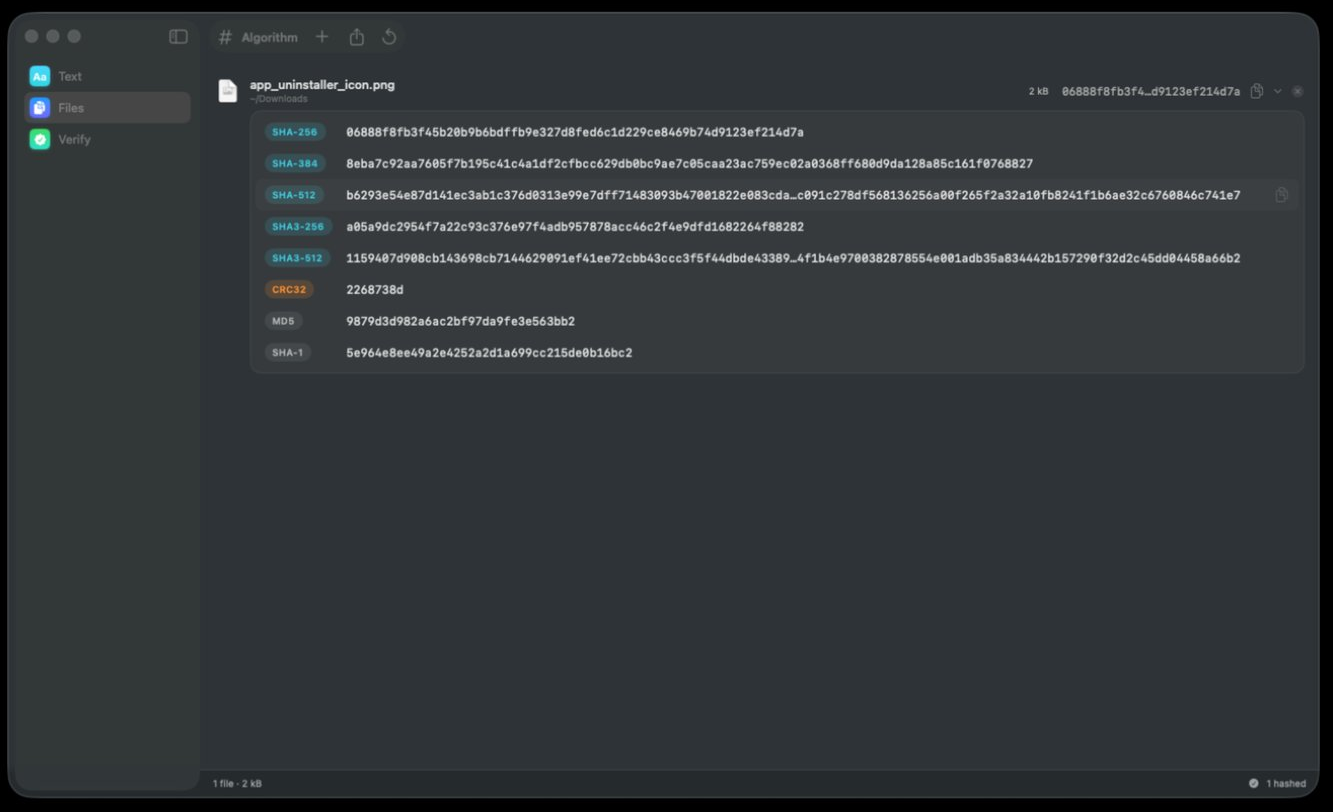
Now go and disturb everything about that file except its contents. Rename it, move it to a different folder, give it a Finder tag, change its permissions. Drag it back in. The row is visibly a different file — a new name, a new folder line beneath it — and the digest is character for character the one you copied. Nothing you did was part of the measurement, which is the same fact stated from the other direction.
It is worth noticing what the toolbar does not offer while you are there. There is an Algorithm control, an add button, an export button and a reset button, and the only one of the four that writes anything writes a new manifest, wherever you tell it to put it. The files in the list are only ever read, which is also why the chevron on a row can open all eight digests without the work going up: the bytes went past once and every answer came out of that pass.
What read-only lets you get away with
Being harmless is not an abstract virtue. It is what makes a handful of ordinary jobs possible at all.
- Reformatting a camera card. Hash the card, hash the copy you offloaded, compare, then erase the card. The hash of the original is the thing that makes the erase defensible — see hashing photo and video files.
- Checking a backup you must not disturb. Verification that wrote to the archive would defeat its own purpose. Verifying a backup covers doing it at scale.
- Somebody else's disk. You can record what a drive contained without altering a thing on it, which is the basis of every chain-of-custody procedure that involves digital material.
- A release you are about to publish. Fingerprint the artifact you built, before anything else touches it. Checksumming a release is the workflow.
The one cost that is real: read-only is not the same as free. A complete read of a large tree takes as long as a complete read of a large tree, keeps a disk spinning and awake, and on a slow external volume can run for hours. Harmless, yes. Instant, no.
Troubleshooting
The modification date changed right after I hashed it
Something else touched the file, and the coincidence in timing is doing the accusing. An application that still had it open, a sync client finishing a write, a restore completing in the background, or an editor you thought you had closed without saving. A read cannot set a modification date; there is no code path from one to the other.
I got a different digest the second time
Then the file changed between the two readings, not because of them. Log files, databases with an open connection, sparse bundles and downloads in progress all do this, and the first digest describes a version that no longer exists anywhere. Hashing a file that is still being written is the page for that whole category.
Can I hash a locked or read-only file?
Yes, and this is the clearest demonstration of the whole point. Locking a file and clearing its write permission both stop writes; neither stops a read. If hashing modified files, a locked file would refuse to be hashed — and it does not.
The file opened in an app instead of being hashed
That is a double-click rather than a drag, and it is the one moment in this story where a write is genuinely possible: some applications update a document on open, and a few will offer to convert an old format before you have touched anything. Drag the file to the tool instead of opening it, and if an app has already asked to convert something, decline.
My Mac got loud while hashing a folder
Sustained reading at a gigabyte or two a second is real work for the storage controller and for anything scanning in parallel, and the fans respond to that. It is load, not harm, and it stops when the run does.
Frequently asked questions
Does hashing a file modify it?
No. Hashing opens the file for reading, streams the bytes through a function that keeps a small running number, and closes it. Nothing is written back — there is no version of the file in memory to write — so the file on disk afterwards is bit-for-bit the file from before.
Does hashing a file change its modification date?
No. Date Modified and Date Created are untouched, because neither is altered by a read. The access timestamp can move, which is the operating system recording that something read the file; APFS updates it lazily so you will often see no change at all, and it is not part of the file's data or of any digest.
Can hashing corrupt a large file or damage an external drive?
No. It is a sequential read, the same thing the drive does when you copy a file or play a video from it, and reads do not wear flash memory — writes do. The one nuance is that a hash reads every byte, so a drive that is already failing may produce an error during it that lighter use had not yet reached. That is the hash finding a problem, not causing one.
Does renaming or moving a file change its hash?
No. The digest is computed from the file's data, not its name, folder, permissions or dates, so a renamed or relocated file keeps the same digest — and a copy on another machine or another operating system produces the same one too. That invariance is what makes a digest usable as an identity rather than just a local checksum.
If two files have the same checksum, are they definitely identical?
Their data is identical, which is what a checksum measures. Everything hanging off the data is not covered: extended attributes, resource forks, Finder tags, permissions and timestamps can differ between two files with the same SHA-256. For almost every purpose that is irrelevant; for a signed app bundle or tags that carry meaning, it is worth knowing.
Is it safe to hash files on a drive that is not mine?
Yes, as far as the drive is concerned — the operation writes nothing to it, so you can record what it contains without altering anything. Whether macOS will let you read it is a separate question with its own answer in permission denied when hashing a folder.